微信支付管理页面
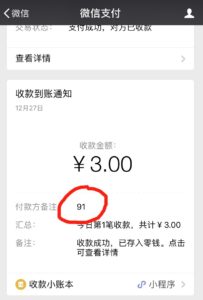
1. 当收到用户付款通知的时候,请根据“付款方备注”的数字在下表中查询和红色用户编号的订单
2. 确认后点击“确认微信已收款”。用户的账户即开通。
3. 把“Status” 从 “pending” 改成 “Success”,并且点击“Save Order”
正在加载。。。(若长时间没有加载成功是因为您没有使用此页面的权限)
jQuery("#board").load("/wp-admin/admin.php?filter=within-a-status&status=pending&page=pmpro-orders table.widefat tr td:nth-child(1) a, table.widefat tr td:nth-child(3)", function() { jQuery(“td.username a”).each(function(){jQuery(this).replaceWith("<" + “div style=‘color:red;font-size:48px’>” + this.href.split(“user_id=”)[1] + “</” + “div>”) }) jQuery("#board a").each(function(){ jQuery(this).html(“确认微信已收款”).attr(“href”, “/wp-admin/"+jQuery(this).attr(“href”)) }); });